
Iget Vapes
how to recharge iget bar with iphone charger
Sep
How to Recharge IGET Bar With an iPhone Charger
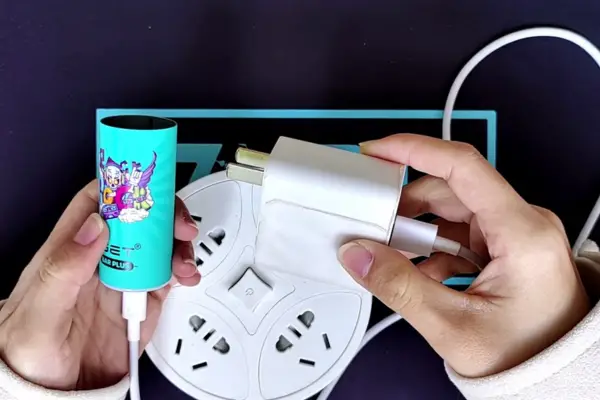
If you have an IGET Bar and an iPhone charger nearby, you may wonder whether the charger can be used to recharge the vape. The answer depends on the exact IGET Bar model. Some IGET products are designed as disposable, single-use devices and are not intended to be recharged, while rechargeable models may include a USB charging port.
The most important rule is simple: only recharge an IGET device if it was manufactured with a charging port and its instructions specifically allow charging. Never attempt to add a charging connection to a disposable vape, open the battery compartment, or connect wires directly to the battery.
This guide explains how an iPhone charger may be used with a compatible rechargeable IGET device, how to identify the correct cable, what to do if charging does not begin, and the safety precautions worth following.
Can You Recharge an IGET Bar With an iPhone Charger?
Whether you can recharge an IGET Bar with an iPhone charger depends on the device and the type of iPhone charger you have.
An iPhone charger normally consists of two separate parts:
- The power adapter, which plugs into a wall outlet.
- The charging cable, which connects the adapter to the device.
For a rechargeable IGET model, the important question is whether the cable connector matches the charging port on the vape.
Many modern Apple charging setups use USB-C, while older iPhones commonly used Lightning cables. A Lightning cable is not automatically suitable for an IGET Bar simply because it charges an iPhone. The connector at the vape end must match the vape’s charging port.
For example, if your rechargeable IGET device has a USB-C charging port, you need a suitable USB-C cable. If it has a different connector, you need the cable specified for that device.
Do not force a connector into the port.
First Check Whether Your IGET Bar Is Rechargeable
Before connecting anything, inspect the bottom or side of the IGET Bar.
Look for a clearly manufactured charging port. Depending on the model, this may be a USB-C port or another designated connection.
If there is no charging port, do not attempt to recharge the device.
This is particularly important with disposable products. A device being advertised with a large puff count does not necessarily mean that it has a rechargeable battery. Some disposable vapes are designed to be discarded after the battery or e-liquid is exhausted.
You should also check the packaging or manufacturer’s instructions for terms such as:
- Rechargeable
- USB-C charging
- Charging port
- Battery capacity
- Charging instructions
If the instructions say the product is non-rechargeable, do not try to find an alternative way to charge it.
What Does an iPhone Charger Have to Do With It?
The phrase “iPhone charger” can cause confusion because there are several different Apple charging configurations.
An Apple wall adapter can provide power to many compatible USB devices, but compatibility depends on the cable, connector, charging requirements, and the device itself.
For a rechargeable IGET Bar, you should think about the charger in two parts:
1. The power adapter
This is the small adapter that connects to the wall socket.
2. The cable
This connects the adapter to the IGET Bar.
The cable must have the correct connector for the vape. If your iPhone cable does not fit the IGET charging port, do not use an adapter or modification simply to make it fit.
A proper connection should be straightforward and should not require force.
How to Recharge a Compatible IGET Bar
If your particular IGET model is rechargeable and has a manufacturer-provided charging port, the basic process is straightforward.
Step 1: Inspect the Device
Check the IGET Bar for visible damage before charging.
Do not charge the device if you notice:
- A cracked or damaged casing
- A swollen battery
- Leakage
- Burn marks
- A damaged charging port
- Exposed internal components
- Unusual heat
If the device has been dropped heavily or damaged, it is safer not to connect it to a charger.
Step 2: Check the Charging Port
Locate the designated charging port.
Make sure it is reasonably clean and dry. Do not insert metal objects into the port to clean it.
If there is visible liquid inside the charging connection, do not connect the charger. Allow the device to be assessed or follow the manufacturer’s instructions for dealing with a contaminated or damaged charging port.
Step 3: Use a Compatible Cable
Use the cable specified for the IGET model.
If the device uses USB-C, a USB-C cable designed for compatible charging can be used according to the manufacturer’s instructions.
If your iPhone cable is Lightning-to-USB-C, remember that the Lightning connector is intended for the iPhone side. It does not make the cable universally compatible with every USB-C device.
The connector going into the IGET must be the correct one.
Step 4: Connect the Cable Carefully
Insert the appropriate connector into the charging port without applying excessive force.
It should fit naturally.
If the connector does not fit, stop. Do not turn the connector sideways, push harder, or modify the cable.
Step 5: Connect the Charger to Power
Once the correct cable is connected, connect the other end to a suitable power adapter and then to a wall outlet, following the manufacturer’s charging instructions.
Avoid charging the device from an unknown, damaged, or suspicious power source.
Step 6: Check the Charging Indicator
A rechargeable device may show a charging light, battery indicator, or another sign that charging has started.
The exact indicator varies between models.
If nothing happens, do not immediately assume the battery is completely dead. Check the cable, power source, charging port, and model instructions first.
Step 7: Allow the Device to Charge as Directed
Do not leave a rechargeable vape charging indefinitely.
Follow the charging time and instructions supplied with the device. Once it has reached the recommended charge level, disconnect it.
You should also avoid using a damaged device simply because it still appears to charge.
Can You Use an Apple USB-C Charger?
A USB-C Apple power adapter may physically connect to a compatible USB-C charging cable, but that does not mean every IGET product should be charged with it.
The device manufacturer’s charging requirements take priority.
If the IGET model is designed for USB-C charging, use the charging setup recommended for that model. If the manufacturer does not specify compatibility with a particular charger or cable, avoid experimenting with alternative charging arrangements.
The safest approach is to use a compatible, undamaged cable and a reputable power adapter rather than trying to improvise a charging solution.
What If You Only Have an Old iPhone Lightning Cable?
An older Lightning cable generally cannot be assumed to charge an IGET Bar.
The Lightning connector was developed for compatible Apple devices. If your IGET has a USB-C charging port, the Lightning connector will not directly fit the vape.
You should not use homemade adapters, stripped wires, modified cables, or improvised connectors.
Instead, obtain the correct cable for the IGET model.
A cable is only one part of the charging system, so compatibility should always be checked between the vape, cable, and power adapter.
What If the IGET Bar Does Not Have a Charging Port?
This is one of the most important situations to understand.
If your IGET Bar has no charging port, do not attempt to recharge it.
Do not:
- Cut open the casing
- Remove the battery
- Attach wires to the battery
- Puncture the device
- Connect it directly to an iPhone cable
- Use a homemade charging adapter
- Transfer the battery into another device
Lithium-ion batteries can present fire and injury hazards when damaged, short-circuited, overcharged, or improperly handled.
A disposable product without a manufacturer-provided charging system should be treated as non-rechargeable.
Why a Vape May Stop Working Even After Charging
A rechargeable IGET can stop producing vapour for reasons other than a flat battery.
For example, the device may have reached the end of its usable e-liquid supply. Charging the battery does not replenish e-liquid.
Other possible causes include:
- A blocked airflow path
- A damaged charging port
- A worn battery
- A faulty coil
- Internal electronics failure
- Liquid leakage
- A damaged draw sensor
If the battery indicator says the device is charged but it still does not operate, repeatedly reconnecting the charger is unlikely to solve the problem.
Do not open the device to investigate the internal components.
What If the IGET Gets Hot While Charging?
Some warmth can occur during electronic charging, but significant or rapidly increasing heat should not be ignored.
If the device becomes unusually hot, smells strange, swells, produces smoke, or behaves unexpectedly, disconnect it from power if it is safe to do so and move away from the device.
Do not continue charging it.
A damaged lithium battery should not be handled casually. If a battery appears swollen or damaged, do not puncture, crush, or attempt to repair it.
Follow local battery and e-waste disposal guidance for damaged or unwanted electronic devices.
Common Mistakes to Avoid
Searching for “how to recharge IGET Bar with iPhone charger” can lead to unofficial suggestions that are unsafe. Several common mistakes are worth avoiding.
Trying to Charge a Non-Rechargeable Disposable
A disposable vape without a charging port should not be modified.
Using the Wrong Connector
A cable that charges an iPhone is not automatically compatible with a vape.
Forcing the Cable
If the connector does not fit, stop. Forcing it can damage the charging port.
Charging a Damaged Device
Cracks, swelling, leakage, exposed wiring, and burn marks are reasons not to charge the device.
Leaving It Charging Unnecessarily
Follow the manufacturer’s instructions and disconnect the device after the recommended charging period.
Charging Near Flammable Materials
Keep electronic charging devices away from materials that could easily catch fire.
Using Homemade Charging Methods
Never connect wires directly to a vape battery or attempt a DIY charging modification.
How to Know Whether the Problem Is the Charger or the IGET
If a compatible rechargeable IGET does not charge, troubleshoot without opening the device.
First, check whether the wall adapter is receiving power.
Next, inspect the cable for visible damage.
Then check whether the cable is properly connected to the device.
You can also check the charging port for obvious debris or damage, without inserting sharp or metallic objects into it.
If the same cable and adapter work correctly with another compatible device but the IGET still does not charge, the IGET itself may have a problem.
At that point, follow the manufacturer’s support or replacement instructions rather than attempting an internal repair.
Does an iPhone Charger Make Charging Faster?
Not necessarily.
Charging speed is controlled by the charging characteristics of the device, cable, and power source. Connecting a higher-output power adapter does not automatically mean that a vape will charge faster.
The IGET’s charging system determines how much power it can safely accept.
Using a more powerful adapter is therefore not a reason to bypass the manufacturer’s instructions.
The goal should be compatible and controlled charging, not the fastest possible charging.
Can You Use Your iPhone While the IGET Is Charging?
Your iPhone and IGET Bar are separate devices. If you are using an iPhone power adapter to supply power to a compatible rechargeable IGET, the iPhone itself does not need to be connected at the same time.
More importantly, do not treat the iPhone cable as a universal charging solution. Always verify the connector and charging requirements of the IGET.
Australia-Specific Considerations
If you are searching for IGET products in Australia, it is important to understand the country’s current vaping regulations.
Australian vaping rules changed significantly from July 2024. The Therapeutic Goods Administration states that vaping goods can only be lawfully supplied through the applicable therapeutic/pharmacy framework, and non-pharmacy retailers cannot legally supply vaping products.
Australian government guidance also states that single-use disposable vapes cannot be purchased from pharmacies, while therapeutic vaping products are subject to specific requirements concerning supply, nicotine concentration, age, prescriptions, and state or territory law.
This means that product availability and legality should not be assumed simply because an IGET Bar is advertised online. The legal status of a particular product can depend on the current Australian regulatory framework and the relevant state or territory requirements.
The Australian Border Force also identifies vaping goods as controlled imports and explains that importation is subject to specific requirements.
For this reason, consumers should obtain vaping products only through lawful channels and should check current official Australian guidance rather than relying on an online seller’s claims.
Frequently Asked Questions
Can I charge an IGET Bar using my iPhone charger?
Only if the particular IGET model is rechargeable and the charging cable and adapter are compatible with its specified charging system. Having an iPhone charger does not automatically make every IGET rechargeable.
Can I use a USB-C iPhone charger?
A USB-C power adapter may be compatible with a suitable rechargeable device, but you should follow the IGET model’s charging specifications. The cable must have the correct connector for the vape.
Can I use a Lightning cable?
Only if the device is specifically designed to accept that connector. Do not use a Lightning cable simply because it charges an iPhone.
What if my IGET has no charging port?
Do not recharge it. Do not open, modify, or connect wires to the device.
Why won’t my IGET charge?
Possible causes include a damaged cable, unsuitable power adapter, blocked or damaged charging port, depleted or failed battery, or an internal fault.
Can I leave my IGET charging overnight?
It is better to follow the manufacturer’s charging instructions rather than leaving the device connected unnecessarily or unattended for long periods.
Can I replace the IGET battery myself?
Do not attempt to replace an integrated vape battery yourself. Opening the casing can expose the battery and electronics to damage and create safety risks.
Final Thoughts
The answer to “how to recharge IGET Bar with iPhone charger” depends entirely on the specific IGET model.
If the device is a manufacturer-designed rechargeable model with a proper charging port, you can use a compatible charging cable and suitable power adapter according to the manufacturer’s instructions. The fact that a charger works with an iPhone does not automatically mean that every vape can use it.
If the IGET Bar is a non-rechargeable disposable, there is no safe reason to modify it simply to make charging possible. Do not cut the casing, connect wires to the battery, or experiment with homemade charging methods.
The safest approach is to identify the exact model, confirm that it is rechargeable, use the correct connector, inspect the device before charging, and stop immediately if the device becomes unusually hot or shows signs of damage.
