
Iget Vapes
how to recharge iget bar
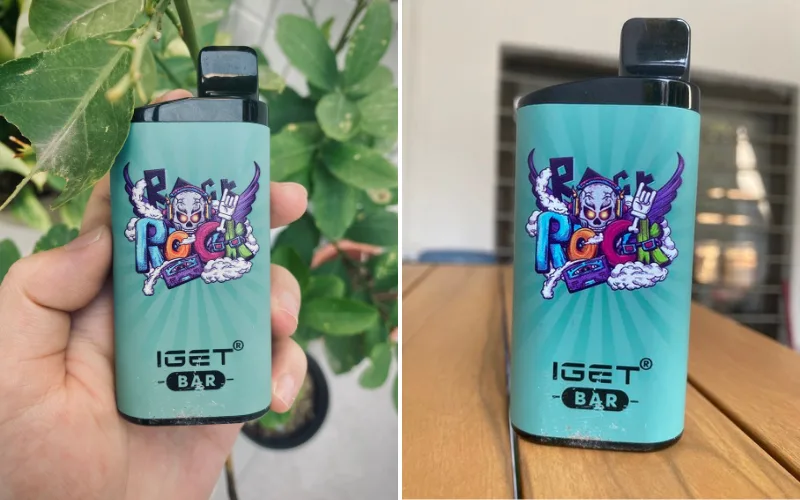
Sep
How to Recharge IGET Bar: A Complete Safety Guide
If you have searched for “how to recharge IGET Bar”, the first thing to understand is that not every IGET Bar is rechargeable. Different IGET models have different battery designs, and some products are intended to be disposed of when the battery or e-liquid is depleted. Trying to recharge a device that was not designed for charging can damage the battery and create a fire or injury risk.
The safest approach is simple: check the exact IGET model and look for a manufacturer-provided charging port and charging instructions before connecting anything to it.
For rechargeable versions, charging generally involves using the appropriate charging connection, placing the device on a stable non-flammable surface, and allowing it to charge according to the manufacturer’s instructions. If your IGET Bar has no charging port, do not attempt to open the casing or connect wires directly to the battery.
This guide explains how to identify a rechargeable IGET Bar, what to check before charging, common charging problems, battery-safety precautions, and what Australian users should know about vaping regulations.
Is the IGET Bar Rechargeable?
One of the most common misunderstandings surrounding IGET products is the assumption that every IGET Bar can be recharged.
That is not necessarily the case.
Some disposable-style vape products are manufactured as single-use devices. Others are rechargeable and include a USB charging connection. The name of a product alone is therefore not enough to determine whether it can safely be charged.
Before searching for a charging cable, inspect your particular device.
Look for:
- A clearly marked charging port
- Manufacturer charging instructions
- A rechargeable-battery indication on the packaging
- A model-specific user guide
- A charging connection designed into the device
If these features are absent, treat the device as non-rechargeable.
Never add your own charging connection
A common mistake is attempting to make a disposable vape rechargeable by opening its casing or connecting wires to its internal battery.
This is unsafe.
Lithium-ion batteries require appropriate charging circuitry to control voltage and current. A battery that has not been designed to accept external charging may overheat, short-circuit, leak, or enter thermal runaway.
For that reason, you should never:
- Cut into an IGET Bar
- Remove the outer casing
- Connect loose wires to the battery
- Use a homemade charging adapter
- Attempt to solder a USB connector onto a disposable device
- Charge a damaged battery
- Leave a modified vape connected to power
If your device does not have a proper charging port, replacing it with an approved product is safer than attempting a DIY conversion.
How to Recharge a Rechargeable IGET Device
If you have confirmed that your particular IGET model is designed to be rechargeable, follow the instructions supplied with that model.
The exact procedure can vary, but the general safety process is straightforward.
Step 1: Confirm the model
Start by checking the packaging and the device itself.
Look for the exact product name and model number. Do not rely solely on pictures from online listings because different IGET products can have different battery arrangements.
If the packaging states that the device is disposable and does not mention charging, do not attempt to recharge it.
If it is specifically identified as rechargeable and has an integrated charging port, continue with the manufacturer’s instructions.
Step 2: Inspect the device
Before connecting the charger, examine the device carefully.
Do not charge it if you notice:
- Cracks in the casing
- A swollen or distorted battery area
- Burning smells
- Signs of overheating
- Liquid around the electronics or charging connection
- A damaged charging port
- Exposed wires
- Corrosion
- Unusual noises
A damaged lithium-ion battery should not be connected to a power source.
If you suspect battery damage, stop using the device and follow appropriate disposal guidance rather than attempting a repair.
Step 3: Use the appropriate charging equipment
Use the charging cable and power source recommended for your particular model.
Avoid experimenting with unusual adapters, damaged cables, loose connectors, or improvised power supplies.
The charging equipment should be compatible with the manufacturer’s specifications.
Do not assume that because a cable physically fits, it is automatically appropriate.
Step 4: Connect the device carefully
Place the device on a stable, dry, non-flammable surface before charging.
Connect the charging cable without forcing the connector.
If the connection feels unusually loose, tight, hot, or unstable, disconnect it.
A normal charging indicator may appear on some rechargeable devices, although the exact light or display behaviour depends on the model.
Step 5: Monitor the charging process
Do not treat charging as something that can simply be forgotten.
Keep the device somewhere visible and away from combustible materials such as:
- Bedding
- Clothing
- Paper
- Upholstered furniture
- Curtains
- Carpets
- Direct sunlight
Do not charge a vape underneath a pillow or blanket.
You should also avoid charging it while sleeping.
If the device becomes unusually hot, smells strange, begins swelling, or behaves unexpectedly, disconnect the power source if it is safe to do so and stop using the device.
Step 6: Disconnect when charging is complete
Follow the manufacturer’s charging guidance rather than leaving the device connected indefinitely.
Once charging is complete, disconnect it and store it somewhere cool and dry.
Avoid repeatedly connecting and disconnecting a damaged or unreliable charging cable because intermittent electrical connections can produce additional heat.
What If Your IGET Bar Has No Charging Port?
This is one of the most important questions when searching for how to recharge IGET Bar.
If your IGET Bar has no charging port, do not attempt to recharge it.
A missing charging port can indicate that the device was manufactured as a disposable, single-use product. Opening the device does not transform it into a rechargeable model.
Inside a disposable vape are electrical components, a battery, a heating element and vaping liquid. These components are not designed for consumers to dismantle and modify.
Trying to recharge such a device can bypass the safety systems normally associated with rechargeable battery products.
Instead, follow the product’s disposal instructions and use an appropriate, legally supplied alternative if you need a rechargeable device.
Can You Charge an IGET Bar With Any USB Charger?
No.
The fact that a USB cable can physically connect to a device does not mean every USB power source is suitable.
Rechargeable vape devices can have specific electrical requirements. The safest option is to use charging equipment recommended for the exact model.
Avoid using:
- Damaged cables
- Homemade charging leads
- Modified connectors
- Unknown electrical adapters
- Chargers that show signs of damage
- Equipment that causes the device to become unusually hot
If the manufacturer’s instructions specify a particular charging method, follow those instructions rather than relying on generic advice.
Why Is My IGET Bar Not Charging?
A rechargeable device that does not appear to charge can have several possible causes.
1. The cable may be damaged
Check the cable for cuts, exposed wiring, bent connectors or other visible damage.
If the cable is damaged, stop using it.
2. The charging port may be obstructed
Dust, debris or e-liquid contamination can interfere with electrical contact.
Do not insert sharp metal objects into the port to clean it. If the port appears contaminated or damaged, refer to the manufacturer’s support instructions.
3. The power source may be unsuitable
The power source can also be responsible for charging problems.
Use the charging setup specified for the device rather than repeatedly testing random adapters.
4. The battery may have reached the end of its life
Rechargeable lithium-ion batteries have a finite service life.
Over time, a battery can lose capacity and eventually stop accepting a charge normally.
A battery that is swelling, overheating or otherwise behaving abnormally should not be used.
5. The device may actually be non-rechargeable
This is easy to overlook.
If your IGET Bar was designed as a disposable product, the lack of charging may not be a fault at all.
Check the model information before troubleshooting further.
How Long Does an IGET Bar Take to Recharge?
There is no single charging time that applies to every IGET product.
Charging duration depends on factors including:
- Battery capacity
- Battery condition
- Charging circuitry
- Power source
- Cable condition
- Model design
- Manufacturer specifications
For that reason, avoid relying on a generic “charge it for X minutes” rule.
The correct charging information should come from the documentation for the exact device.
If no charging instructions exist because the product is disposable, do not attempt to establish a charging time yourself.
Signs You Should Stop Charging Immediately
Battery safety is more important than getting a device working again.
Stop charging if you notice:
- Excessive heat
- A swollen casing
- Smoke
- Sparks
- Burning or chemical smells
- Liquid leaking into the charging area
- Unusual popping or hissing
- Visible battery damage
- A charging port becoming extremely hot
Do not continue charging simply because the device still appears to function.
A damaged lithium-ion battery can become hazardous without much warning.
If there is smoke or fire, prioritize personal safety and emergency procedures. Do not handle a severely overheated battery with bare hands.
Can You Recharge an IGET Bar After It Runs Out of E-Liquid?
Recharging the battery and replenishing e-liquid are two different things.
A rechargeable battery does not automatically mean that the device is refillable.
If the device contains no e-liquid remaining, charging the battery does not restore the liquid supply.
Likewise, a device that has remaining e-liquid but a depleted battery may require charging if it was specifically designed as a rechargeable product.
Do not inject e-liquid into a disposable device unless the manufacturer explicitly designed that model to be refillable.
Opening a sealed vape can expose electrical components to liquid and create additional risks.
Rechargeable Does Not Mean Refillable
This distinction is particularly important for people comparing different IGET products.
A product may have:
A rechargeable battery but a sealed e-liquid reservoir.
In that situation, the battery can be recharged, but the user should not assume that the liquid reservoir can be opened or refilled.
Another product might have:
A rechargeable battery and a replaceable pod or cartridge.
That is a different design.
The exact product documentation should determine what functions are supported.
Battery Safety Tips for IGET Users
Whether you use a rechargeable vape device or another lithium-ion product, basic battery safety is important.
Keep the device away from extreme temperatures
Avoid leaving a vape in a hot vehicle, direct sunlight or other areas exposed to extreme heat.
Likewise, avoid exposing it to very cold conditions for prolonged periods.
Keep the battery dry
Water and electronics do not mix.
If the device becomes wet, do not immediately connect it to a charger. Allow the appropriate manufacturer-recommended inspection or handling process to take place.
Avoid physical damage
Do not sit on the device, crush it, throw it around, or carry it in a way that could damage the casing.
Don’t carry loose batteries
If a device contains a removable lithium-ion battery, loose batteries should not be carried alongside metal objects such as coins or keys because accidental contact can create a short circuit.
Don’t sleep while charging
Even if a device has previously charged without problems, leaving lithium-ion products unattended for long periods is not a good safety practice.
What Does a Blinking Light Mean?
A blinking light can have different meanings depending on the model.
For example, an indicator could signal:
- Charging
- Low battery
- Completed charging
- A connection problem
- An electrical fault
- A protection feature
There is no universal IGET light code that applies to every model.
If your device is flashing unexpectedly, check the instructions for that specific model rather than assuming the light means the battery is charging.
Should You Use a Fast Charger?
Do not assume that a high-powered fast charger is automatically appropriate for a vape.
Charging systems are designed around particular electrical requirements. The manufacturer’s specifications should take priority over generic fast-charging technology.
If the documentation does not recommend a particular high-output charger, avoid experimenting with one.
The objective is not simply to charge the battery as quickly as possible. The objective is to charge a compatible rechargeable device using an appropriate charging system.
IGET Bar Charging and Australian Regulations
Australian readers should also understand that the question of how to recharge an IGET Bar is separate from the question of whether a particular product can legally be supplied.
Australia introduced major vaping reforms beginning on 1 July 2024. The Therapeutic Goods Administration states that the reforms prohibit the importation, domestic manufacture, supply, commercial possession and advertising of disposable single-use and non-therapeutic vapes. Therapeutic vaping products are subject to a different regulatory framework.
The TGA currently states that therapeutic vapes for smoking cessation and management of nicotine dependence can be supplied through participating pharmacies when the applicable requirements are met. State and territory rules can impose additional restrictions.
The TGA also maintains a notified vape list for therapeutic vaping goods that may be lawfully supplied through the applicable pathways. These products are not necessarily included in the Australian Register of Therapeutic Goods and have not been evaluated by the TGA for safety, quality, efficacy or performance in the same way as registered therapeutic goods.
Therefore, Australians should not assume that a product advertised online is necessarily authorised for lawful supply in Australia.
Why Product Verification Matters
Online vape listings can sometimes use model names inconsistently.
One seller may describe a product as rechargeable, while another listing may use the same product name for a different version.
This is why checking the physical device, packaging and manufacturer’s documentation is more reliable than relying on a generic online description.
Before charging, verify:
- The exact model name.
- Whether the manufacturer identifies it as rechargeable.
- Whether it has a purpose-built charging port.
- Which charging equipment is recommended.
- Whether the device shows any signs of damage.
- Whether the product is lawfully supplied in your jurisdiction.
Common Mistakes to Avoid
Several mistakes appear repeatedly when people search for information about recharging disposable-style vape products.
Mistake 1: Assuming every IGET Bar is rechargeable
Different models can have different specifications.
Mistake 2: Adding a USB port yourself
This can expose the battery and electrical components to dangerous conditions.
Mistake 3: Charging a damaged device
A damaged lithium-ion battery should not be treated as normal.
Mistake 4: Leaving the device charging unattended
Monitor the charging process and follow the manufacturer’s instructions.
Mistake 5: Using an unknown charger
Use compatible equipment specified for the particular device.
Mistake 6: Assuming charging restores empty e-liquid
Battery power and e-liquid supply are separate.
Mistake 7: Ignoring Australian regulations
Product availability and legal supply are regulated in Australia and can change over time.
Frequently Asked Questions
Can I recharge a standard IGET Bar?
Only if the exact model was designed by the manufacturer to be rechargeable. If there is no purpose-built charging port or charging instruction, do not attempt to modify it.
How do I know whether my IGET Bar is rechargeable?
Check the exact model, packaging and manufacturer’s instructions. A dedicated charging port is one indication, but model-specific documentation should be the deciding factor.
Can I open an IGET Bar to recharge the battery?
No. Do not open or modify a sealed disposable device to access its battery.
Can I use a phone charger?
Do not assume a phone charger is suitable simply because its connector fits. Follow the charging specifications for the exact rechargeable model.
Why won’t my rechargeable IGET device charge?
Possible reasons include a damaged cable, unsuitable power source, damaged charging port, depleted battery or an internal fault. If the device becomes hot or shows physical damage, stop charging it.
Can I refill an IGET Bar after charging?
Rechargeability does not automatically mean refillability. Follow the product’s specific design and instructions.
How long should I charge an IGET Bar?
There is no universal charging time. Use the manufacturer’s instructions for your specific rechargeable model.
Is it safe to leave an IGET Bar charging overnight?
It is better to avoid unattended or overnight charging. Follow the manufacturer’s charging instructions and monitor the device.
What should I do with an IGET Bar that cannot be recharged?
Do not attempt a DIY battery repair. Follow applicable local disposal and recycling guidance for electronic or lithium-battery products.
Final Thoughts
When people search “how to recharge IGET Bar,” the most important answer is that charging depends on the exact model. Some vape devices are manufactured with rechargeable batteries and dedicated charging connections, while disposable products may not be designed for charging at all.
If your IGET device is specifically identified as rechargeable, use only the charging method recommended for that model. Inspect the device before charging, use compatible equipment, keep it on a stable non-flammable surface, avoid extreme temperatures, and stop immediately if the battery becomes unusually hot, swollen, damaged or otherwise abnormal.
If your IGET Bar has no charging port, do not attempt to create one. Cutting open the casing, attaching wires or experimenting with the internal battery can introduce significant electrical and fire hazards.
Australian users should also check the current TGA requirements and relevant state or territory rules before obtaining or using vaping products. The regulatory framework is specific to therapeutic vaping goods and includes restrictions on supply, importation, advertising and access.
Ultimately, the safest way to approach IGET Bar charging is to identify the exact model first and follow its official instructions rather than applying generic charging techniques to a product that may not have been designed to be recharged.
